 Barcode Next
Privacy, licensing and third-party notices
Learn about local barcode processing, offline access, internet requirements for Store licence checks and third-party notices.
Barcode Next performs barcode generation and most file processing locally. You do not sign in to a Barcode Next account. Store purchase verification is handled by Apple or Microsoft rather than a Barcode Next activation server.
Free editing and Pro output
Barcode Next is free to download and use for creating, customizing, validating and previewing barcodes. You can configure all export formats, batch workflows and label-sheet layouts before paying.
Barcode Next Pro unlocks saving exported files and sending print jobs through a one-time purchase, with no subscription. Pro purchases are separate for the Mac App Store and Microsoft Store. An inactive Pro licence does not restrict editing or previews.
Check licence status and restore purchases
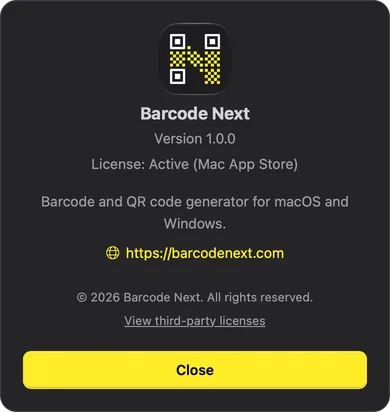
- Open Help → About Barcode Next to view the License status and Store source.
- Free means that no Pro entitlement is active; it is not a licence error.
- If you already own Pro, sign in to the Store account used for the purchase and choose Restore purchases in Barcode Next.
- For a failed verification, use Retry to check again or Restore purchases to recover an existing purchase.
If Pro verification is unavailable
When Pro is not active, the UI shows PREVIEW ONLY and disables actual file export and printing. A verified Free user is offered Unlock Pro on final output, whereas a previously verified Pro user receives a License verification failed dialog with Retry and Restore purchases. Neither state prevents continued editing.
A temporary Store error does not revoke otherwise usable verified entitlement evidence. Offline Pro output depends on the Store supplying acceptable local evidence; a fresh verification may be necessary after reinstalling or changing Store accounts. Confirmed refunds or revocations can disable Pro output.
If export or print remains locked
- Check the licence status in About Barcode Next.
- Confirm that you are using the original Mac App Store or Microsoft Store account.
- Use Retry and, if necessary, Restore purchases.
- If your Store recognizes Pro but Barcode Next does not, contact support@barcodenext.com with your OS, app version and displayed status. Never share payment credentials.
See Troubleshooting for additional output failures.
Local data and privacy
Barcode values, preview generation and export preparation are processed locally. The output barcode itself is not secret: anyone with a compatible reader or access to the printed image may be able to decode it. Avoid putting passwords, access tokens or other confidential information in public-facing symbols.
The website’s separate consent-based analytics are described in the Privacy Policy.
Third-party licences
In About Barcode Next, choose View third-party licenses to inspect bundled notices offline. These library licences do not change the app’s commercial proprietary licence.