 Barcode Next
Appearance and colors
Configure barcode colors, human-readable text and preview appearance.
The Appearance and Text option tabs affect the rendered artwork. The controls are filtered by the selected symbol; QR-only styling does not appear for unrelated symbologies.
Set colors in Appearance
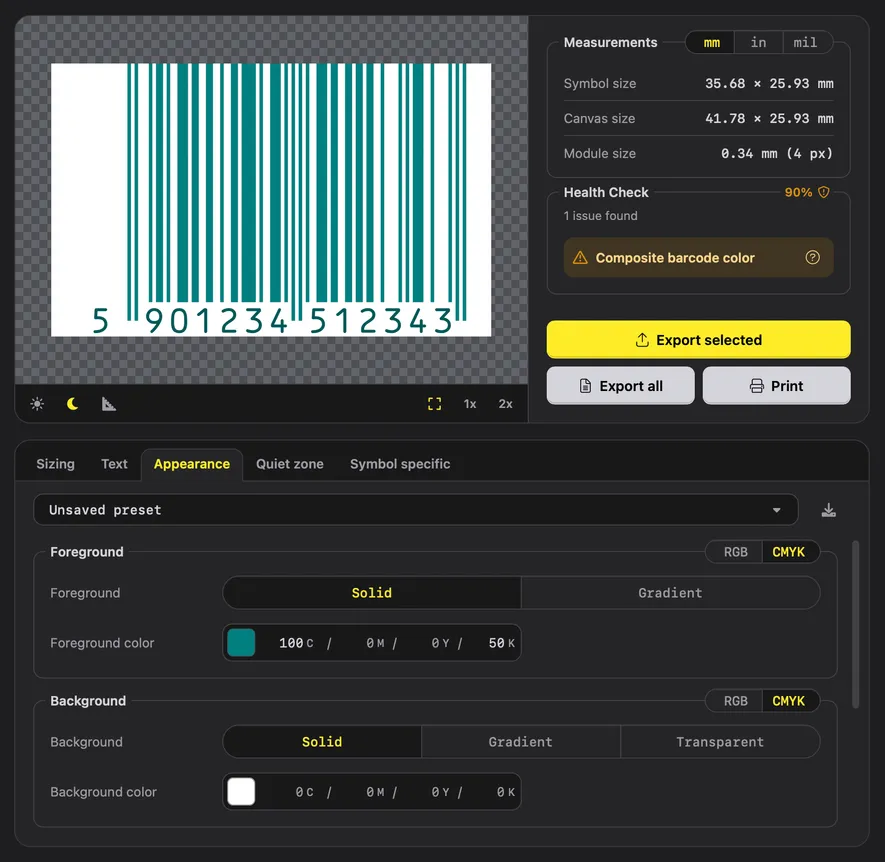
- Select the current record and open Options → Appearance.
- Use Foreground to adjust bar/module color and Background for the surrounding field where offered.
- Select a color using the picker or supported channel values. Some controls expose RGB/CMYK editing; the export file’s supported Color mode is set separately in the export dialog.
- Observe the live Preview after each change, particularly when reducing contrast.
Start with dark modules on a light background. Small color differences on screen can reproduce poorly after CMYK conversion or printing on reflective substrates.
Text tab and human-readable data
- Open Options → Text for a format with visible human-readable data.
- Adjust the provided Font, Size, text color or alignment controls where available.
- Check format-specific labels such as Retail label or Add-on text only when the selected symbology exposes them.
- If an Alternate text field is offered, remember that changing displayed text does not change the value encoded in the bars.
Human-readable characters assist manual entry; scanners decode the bars/modules, not the printed label. Keep text clear of quiet zones and inspect the final artwork at its actual size.
Additional appearance controls
Some formats offer border, bearer-bar, guard-bar or dot-rendering settings; others do not. Use the requirements of the chosen symbol rather than applying a decorative setting uniformly.
QR Code and GS1 QR Code have separate module/finder shape controls and centered-logo support. See QR customization.
Preview is not export
The Preview canvas’s checkerboard background, guides and zoom are inspection aids. The Background color you set in Appearance is part of the symbol artwork where supported. A dark app theme does not make exported barcodes dark. Confirm the saved file in its target software, especially if transparency is involved.